
Your float plan is an important safety tool when you’re on your boat. Many cruisers, however, either don’t use one or don’t use one as effectively as they could.
What’s a Float Plan?
A float plan is a document with details of your planned trip should search and rescue be necessary. It includes expected ports and arrival dates/times, and important information about your boat. You leave it with a knowledgeable person who is not on your boat. It provides the necessary details for someone to “sound the alarm” if you don’t check in as expected. You do not file it with any government authority.
No matter what other communications and emergency gear you have, you should also use a float plan. It provides additional information and sets up an “off boat” backup emergency system. If your communications go down, your designated person ashore can notify both the authorities and other boaters that you are overdue. Or, if you set off your EPIRB or make some other emergency call (cell or sat phone, VHF, SSB, tracking device), it will provide detailed information about your boat and the equipment aboard for the rescuers.
When Should You Use a Float Plan?
You should leave a float plan anytime you’re out on the water, just in case something unexpected happens. Admittedly, many of us don’t leave one for day sails, or perhaps leave more informal information.
We tend to think about setting one up more for “big trips.” These include crossing the Gulf Stream to the Bahamas or Cuba — or for multi-day passages. You definitely want to leave one for these trips — but read below on who to leave it with.
For shorter day trips or coastal trips, we completed a float plan with all the pertinent information about the boat. We left off day-to-day details and sent it to our emergency contact (learn more about choosing your emergency contacts). Then each day, we send a quick email or text with that day’s planned itinerary and time to start worrying if we haven’t checked in. It’s a good idea to send it as an email or text so that the person has a written record. It’s all too easy to forget what was said in a phone call.
IMPORTANT: Be sure that you do check in with your emergency contact at the end of your trip or if your plans change. Also, if you use a Spot or inReach tracker, be sure to tell them (and any worrywarts in your family) not to prematurely panic if it stops transmitting — explain that it’s possible for you not to notice it needs recharging (several friends’ trackers have stopped tracking mid-way through a trip and they didn’t realize immediately that they needed to plug it back in to recharge).
Who To Leave Your Float Plan With
It may seem logical to leave your float plan with someone in your family, but that’s not always a good idea if they are not also boaters. Simply put, you want someone who will sound the alarm when appropriate — that is, they won’t either forget or initiate search and rescue before there is cause for alarm.
We find that close cruising friends who are in — or at least familiar with — the same general area are best. Key qualities:
- Responsible
- Not heading out themselves
- Pay attention to weather (knowing that a wicked squall crossed your path would be important, as would knowing that winds were light for a sailboat that didn’t plan to motor)
- Calm in an emergency (no drama queens!)
- Knowledgable about who to contact
- Good communications capabilities as appropriate for the area (generally, this means a cell phone with plenty of minutes and good coverage) should there be an emergency.
Your contact does not need to be at your start or end point — they simply need to be where you can let them know your plans and that you’ve arrived safely (or need help or have changed plans).
Many times, the person you leave your float plan with won’t be listed as one of your emergency contacts on your EPIRB. Make sure that your EPIRB contacts know who has your float plan in case information is needed. Since none of our family members are boaters, we do not leave our float plan with them but we do tell them who to contact (the person we left the float plan with) if they can’t reach us and are worried. We’re simply trying to avoid having S&R called when we are perfectly fine.
Completing and Downloading the Float Plan
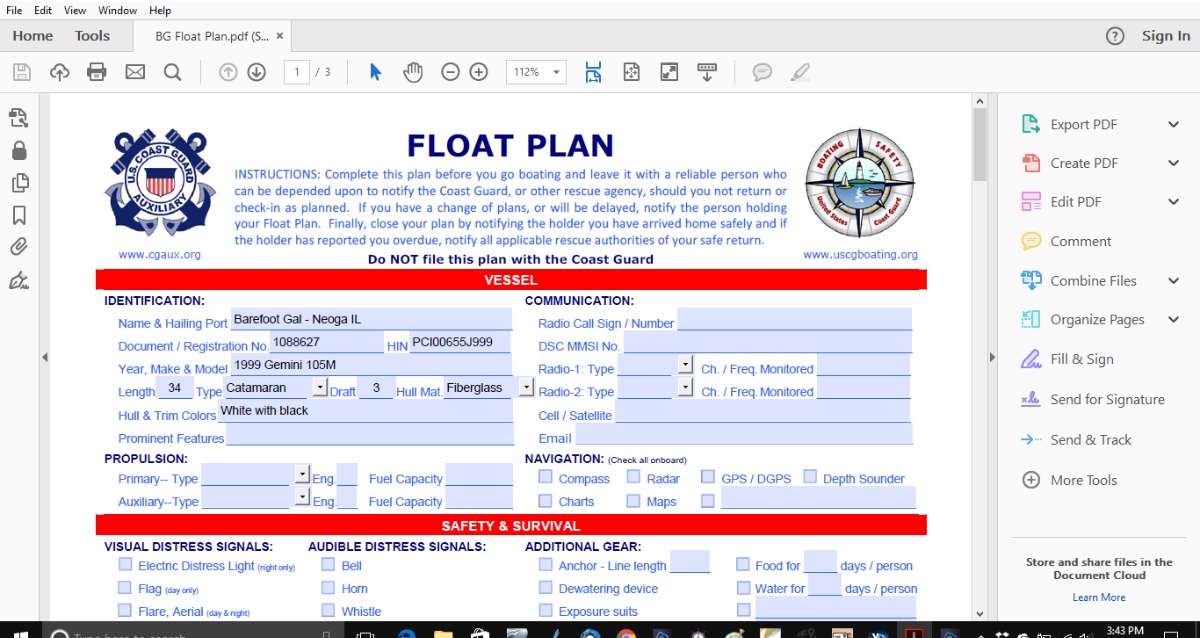
Several organizations — BoatUS, Power Squadron and others — offer PDF “fill-in-the-blank ” float plans. My favorite is the one put out by the US Coast Guard Auxiliary.
Potential Problem
When you click on the link, you get a fillable PDF. However, if you try to download the form, you will find it is password protected. Of course, the password is set by the Coast Guard Auxiliary and you will have no way of opening it after you download the form. Luckily, your browser will give you a better option.
The Solutions
Instead of downloading the form, complete it online and then “print” it as a PDF. This will allow you to save the document once completed. If you “print” the document prior to completing it, you will lose the ability to complete the blanks on your computer.
Of course, you will find many of the sections are redundant. To avoid having to enter the same information every time you complete a float plan, save a completed version so you can copy and paste the repeated information or use a PDF editor, like Adobe Acrobat to be able to open, change, and save the form.
In truth, for many of us, the form is more detailed than many of us need. I can assure you, we never had room for the number of potential passengers on the form. Some cruisers use the Coast Guard Auxiliary form as a guide and create their own float plan in their preferred word processing app. Member of the Boat Galley Team, Pamela Douglas, did this. She found it an easy way to update the form for each leg of the cruise.
Of course, PDFs and word processing apps seem almost quaint. After all, many of us rely on our phones and tablets instead of a laptop to manage our lives. If that’s you, keep reading.
The USCG Mobile App
Reader Paul Herlihy is a member of the Coast Guard Auxiliary, and he told us about the USCG Mobile App. Download the app to file your float plan and email it directly to your chosen contacts. Herlihy notes that the plan only goes to your designated recipients, not the Coast Guard or Auxiliary. In addition, the app has information about safety rules, location of nearby NOAA buoys, and more.
Regardless of which method you use, a float plan is a crucial piece of safety equipment. Don’t forget to file yours.
You Might Also Be Wondering About . . .

Carolyn Shearlock has lived aboard full-time for 17 years, splitting her time between a Tayana 37 monohull and a Gemini 105 catamaran. She’s cruised over 14,000 miles, from Pacific Mexico and Central America to Florida and the Bahamas, gaining firsthand experience with the joys and challenges of life on the water.
Through The Boat Galley, Carolyn has helped thousands of people explore, prepare for, and enjoy life afloat. She shares her expertise as an instructor at Cruisers University, in leading boating publications, and through her bestselling book, The Boat Galley Cookbook. She is passionate about helping others embark on their liveaboard journey—making life on the water simpler, safer, and more enjoyable.
Carolyn Shearlock says
Thanks — had never run across that! Here’s the link to the CG page discussing it (has links for both iOS and Android): http://uscgboating.org/mobile/